
Authentication
Clients authenticate with the APIs by signing up with an account and creating a subscription key. A subscription key is used to make authenticated requests.
Clients should keep their API secrets hidden and stored securely. For example, a server-side app should never expose its secret to users.
The authentication process consists of the following two steps:
Acquire a subscription key
Acquire ClientID and ClientSecret.
Use ClientID and ClientSecret to retrieve access token from OAuth endpoint
Use the subscription key and access token to make authenticated requests
The following endpoint and the screenshot shows how to get the access token from postman
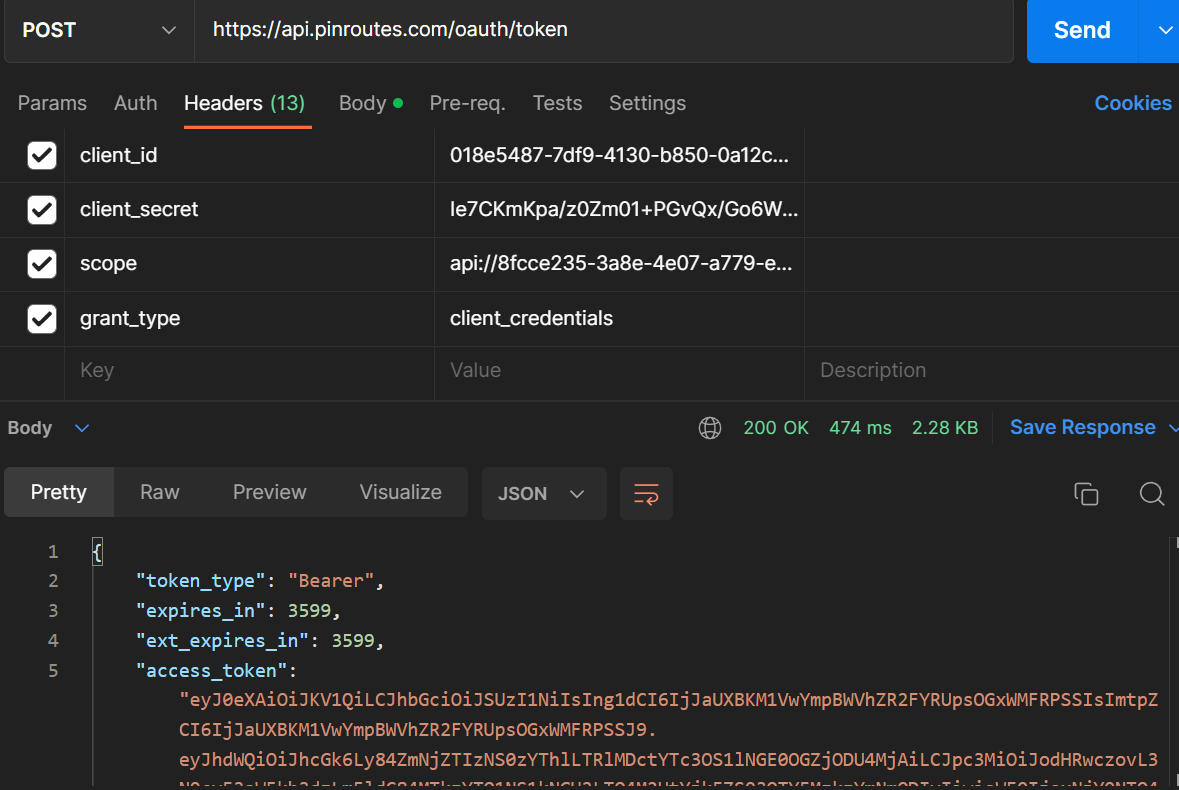
Acquire an access token
Sign in to your account with your credentials. If you don't have an account you can create one by signing up
Get a key by creating a subscription. Keys and subscriptions can be viewed in your profile.
Authenticating requests
All requests must be authenticated with a subscription key supplied as the value to header named "Ocp-Apim-Subscription-Key" and with access token supplied as bearer token in the header. Pass clientId, clientSecret, grant_type and scope to the OAuth endpoint to retrieve the access token. Code samples and an interactive console demonstrating how to make requests can be viewed by selecting an operation in the api details and clicking on "try it".